
Plan once,
execute cheap.
A 3-step SDD workflow CLI for AI coding agents. Your strongest model plans once — now directly from the terminal — and a cheap model executes many times. With Anthropic that planning pass runs on your Claude subscription by default: no API key, no per-token API bill. An API key still works if you prefer one.
Sign in once: squad auth login · visual console: npx squad-kit console
$ squad init
✓ Initialized .squad/ · planner: anthropic · tracker: jira
  credentials saved to .squad/secrets.yaml (0600, git-ignored)

$ squad new-story checkout --id ENG-42
  fetching ENG-42 from Jira · title · description · 2 attachments
✓ wrote .squad/stories/checkout/ENG-42/intake.md

$ squad new-plan --api
  picker · intake · planner (claude-opus) reading repo files on request
✓ wrote .squad/plans/checkout/01-story-add-guest-checkout.md
~9 KB — ready for a cheap executor▊Three steps. One artifact.
squad-kit separates the two things every SDD tool conflates: thinking and typing.
Write an intake
Scaffold a story folder. Use `squad new-story <feature> --id <ID>` to auto-fetch title, description, labels, and attachments from Jira or Azure DevOps — or `--no-tracker` for a manual intake.
Plan once, expensively
Your strongest model reads the intake and requests repo files on demand (budget-enforced). Writes one concrete plan: paths, line ranges, type signatures, verification commands. Run inside your agent, or directly with `squad new-plan --api` — on Anthropic that runs on your Claude subscription unless you configure an API key.
Execute cheaply, many times
Fresh agent session. Attach only the plan file — no meta-prompts, no cross-artifact reads. A cheap executor ships the code.
Stop paying top-tier tokens for typing work.
SDD has two phases every tool conflates: thinking (reading code, weighing tradeoffs) and typing (applying edits, running tests, wiring things up).
Thinking is expensive per token and benefits from the best model you have. Typing is verbose and repetitive — a weak model can do it, if the plan is concrete enough.
squad-kit is built around one rule:
plan once, execute cheap.
Every task in a squad-kit plan has a file path, a symbol or line range, a type signature or command.
Vague guidance like "consider introducing a service layer" does not belong there — that's a planning decision, not a task.
The direct planner (squad new-plan --api) does not change
the math — the expensive model still plans once per story. It just shortens the path from intake to plan file.
A visual console for everything
squad console opens a local, dark-modern web UI on port 4571.
Every CLI capability has a panel; the planner streams live over SSE.
Redesigned for 0.6.0 — Vercel-inspired palette, command palette, keyboard shortcuts.
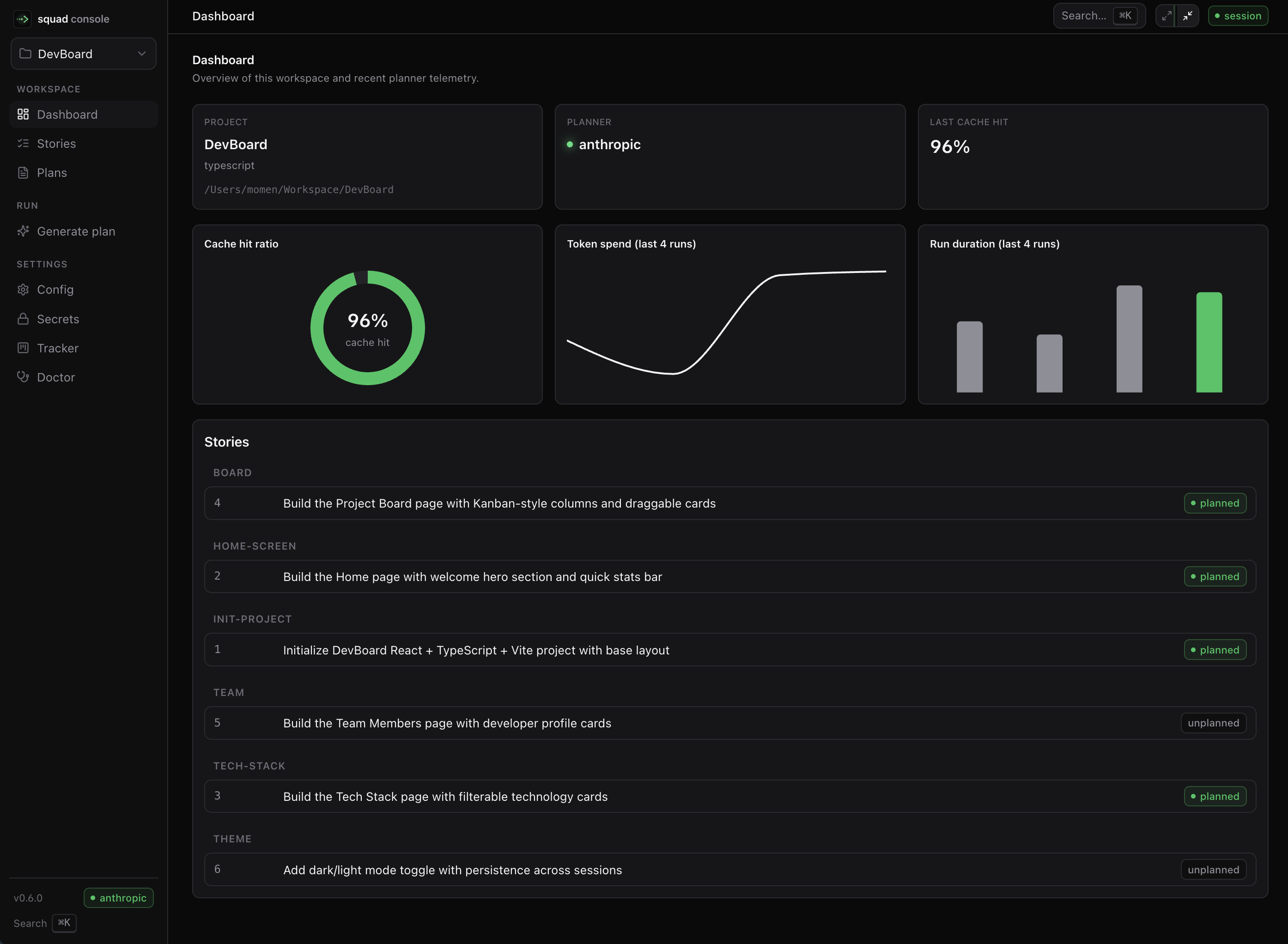
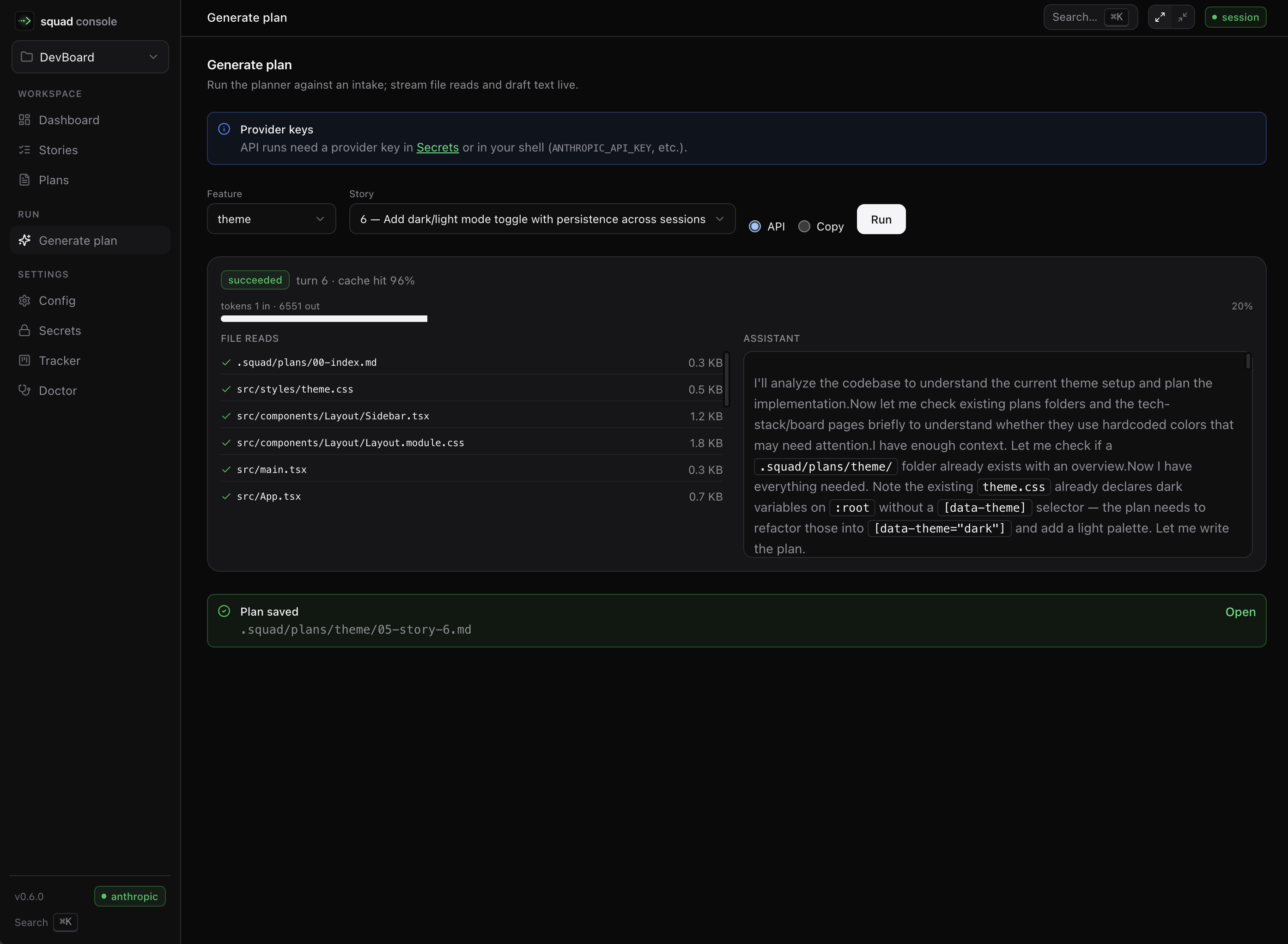
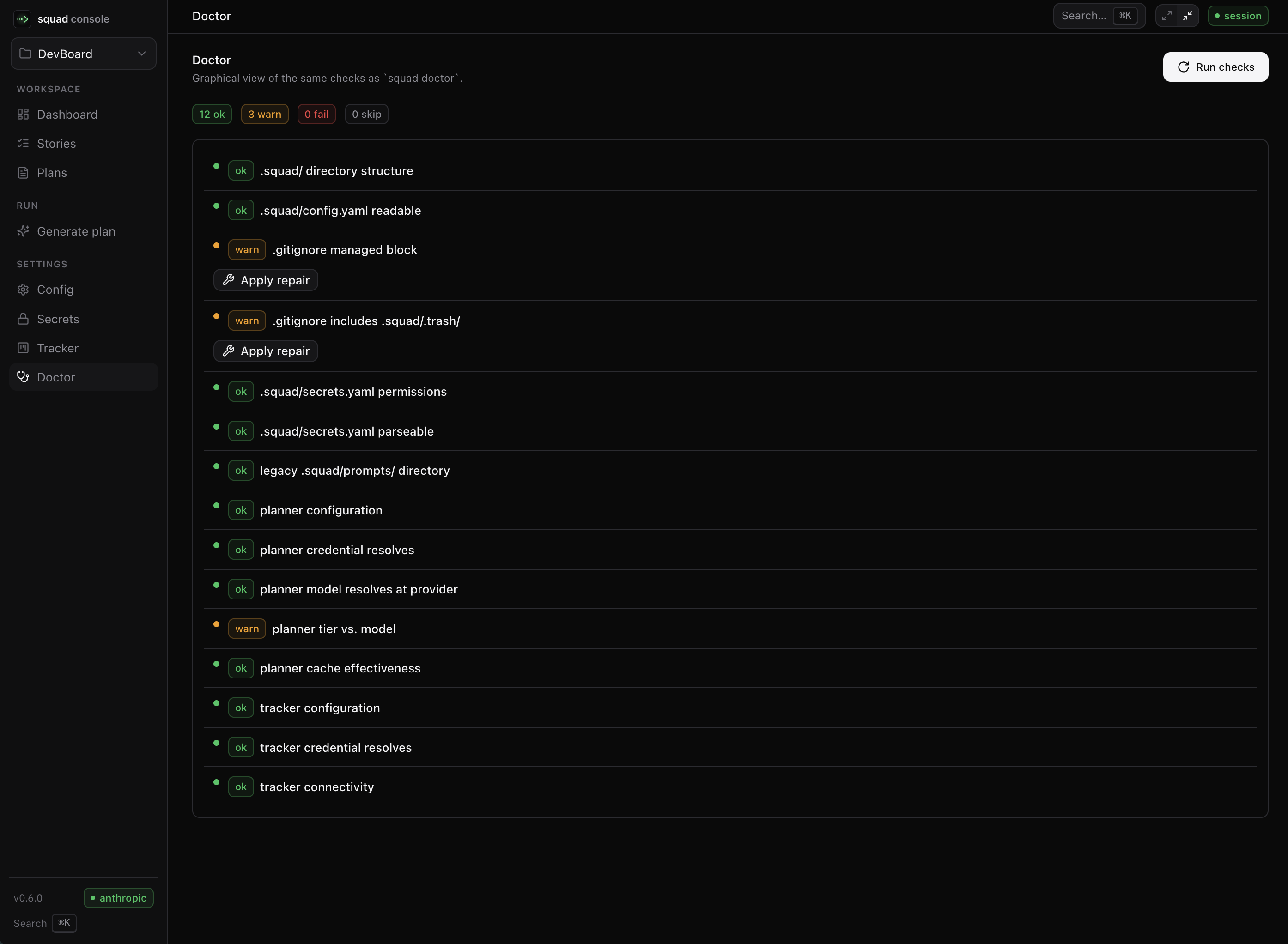
Run squad console from any squad-kit workspace to try it.
Plan with the account you already pay for.
0.12.0 makes your Claude subscription the default way to plan with Anthropic, and 0.12.2 fixes the planner so it reads your repo on that path. Same philosophy, sharper tools, and nothing breaking in your stories and plans.
Plan on your Claude subscription
Sign in with your Anthropic account and the direct planner runs on your Claude plan — no API key. Usage draws on the same limits as Claude and Claude Code, so there is no per-token API bill.
Auth you can see
planner.auth.anthropic picks subscription, api-key, or auto. squad doctor explains the resolved mode; the console shows your Claude account and badges every run with the credential it used.
Run history you can replay
Every --api run persists a summary and an event timeline under .squad/runs/. The console gained a runs index and a full run report page. Thinking text is redacted on disk.
Claude Agent SDK planning
Anthropic planning runs on the Agent SDK by default so Opus can use adaptive thinking and effort. Runtime, thinking, and effort are all configurable per phase.
Visual console
squad console launches a local UI for stories, plans, live planner runs, config, secrets, tracker, and doctor. Same workspace; same files; nicer surface.
Planner limits you control
When a budget bites, the CLI asks before more API spend. Incomplete runs save a .partial.md; clean runs keep short NN-story-<id> filenames. Higher default planner output cap.
Prompt caching
Anthropic, OpenAI, and Google caching enabled out of the box. A 10-turn planning run bills ~70% fewer input tokens. Tier 1 Opus finally works for real repos.
Direct planner
Run the strongest model from the terminal. Demand-driven context. Budget-enforced.
Tracker auto-fetch
Pull title, description, labels, and attachments from Jira Cloud or Azure DevOps Services.
Secrets split
.squad/secrets.yaml is 0600 and git-ignored. Config stays committable.
Health check
Full read-only probe. --fix makes only non-destructive repairs.
One-shot migration
Idempotent 0.1.x → 0.2.0 structural update. --dry-run first.
Safe deletion
Cascading cleanup with --dry-run and --trash for recovery.
squad-kit vs Spec-Kit
Same problem, opposite philosophies. Pick the one that matches how you already work.
| Dimension | squad-kit | Spec-Kit |
|---|---|---|
| Plan-turn starting context | intake (~2 KB) + meta-prompt (~5 KB) + files planner requests on demand | spec.md + plan.md + constitution + /plan template + research |
| Implement-turn starting context | one plan file (~5–15 KB) | /implement template + tasks + plan + data-model + contracts + … |
| Artifacts per story | intake.md + NN-story-<slug>.md | spec + plan + data-model + contracts/ + research + quickstart + tasks |
| Direct-from-terminal planning | squad new-plan --api (Anthropic, OpenAI, Google) | agent-only |
| Tracker intake fetch | built in: Jira Cloud, Azure DevOps Services | not prescribed |
| Planning safety nets | none (trust the planner) | /clarify, /analyze, checklists |
| Customization | squad config · intakes · fork to change prompts | template override stack + presets |
| Runtime | Node + TypeScript · npm | Python 3.11+ · uv |
- → You trust your planner (Opus, GPT-5) and want lean implementation turns.
- → You already live in Node / TypeScript tooling.
- → You want prompts as plain files in your repo — editable, committable.
- → You run a cheap model for execution and want real savings.
- → You want /clarify + /analyze to catch spec–plan drift automatically.
- → Your team includes non-engineers editing specs.
- → You're already in Python / uv tooling.
- → You want a governance / constitution layer built in.
Sixty seconds from zero.
Requires Node 18+. No telemetry. No background services. Planning with Anthropic needs no API key — sign in with your Claude subscription.
Native slash commands, four agents.
squad init installs a /squad-plan command into the agent you pick.
Don't see yours? squad new-plan prints the composed prompt to stdout — paste it anywhere.
One plan. A hundred turns. Real savings.
Install squad-kit. Write your first intake. Let your best model plan once. Then let the cheap one work.