Squad console
What is squad console?
squad console starts a local-only web UI that mirrors the squad-kit CLI: same .squad/ files, same config and secrets, no separate database. From your project root run squad console (default port 4571). The CLI prints a URL with a one-time session token; your browser stores the token in sessionStorage. Use --no-open to skip launching a browser if you prefer to paste the URL yourself.
Keyboard shortcuts
| Action | Shortcut |
|---|---|
| Open command palette | ⌘K / Ctrl+K |
| Show this cheatsheet | ? |
| Dashboard | g d |
| Stories | g s |
| Plans | g p |
| Generate plan | g r |
| Config | g c |
| Secrets | g k |
| Tracker | g t |
| Doctor | g h |
| New story | n s |
| Close any dialog | Esc |
Density
Use the top bar Comfortable / Compact control to change list spacing and type scale. The choice is stored in localStorage and applies on the next page load.
Security model
- Loopback binding — the server listens on
127.0.0.1only; it is not exposed to your LAN by default. - Token-gated API — every
/api/*request requires theBearertoken (or?t=query) from the launch URL; without it you get401. - Secrets — the Secrets page masks values; YAML is edited through the same validation paths as the CLI.
- CSP — responses use tight Content-Security-Policy headers suitable for the bundled SPA.
Dashboard
Three summary cards (Project, Planner, Last cache hit) match the top-of-workspace snapshot. Below them, when you have run history:
- Cache hit ratio — ring chart from the latest
.squad/.last-run.jsontelemetry. - Token spend — sparkline of
inputTokens + outputTokensover the last 20 runs (from.squad/runs/*.json). - Run duration — bar chart of recent run lengths in seconds.

Stories
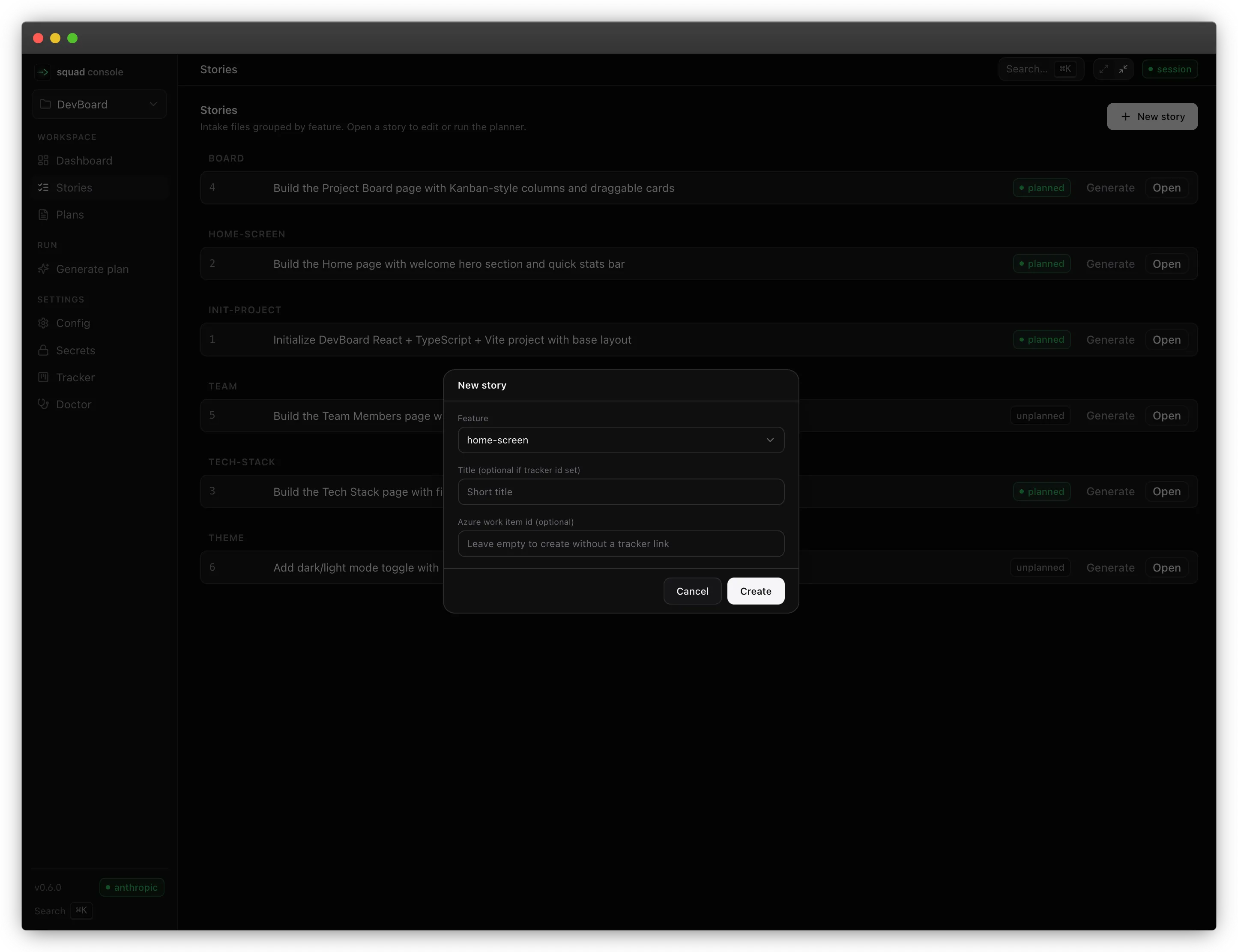
List by feature, create from the New story dialog, edit intake markdown, delete (trash or permanent). Same folders the CLI would create.
Plans
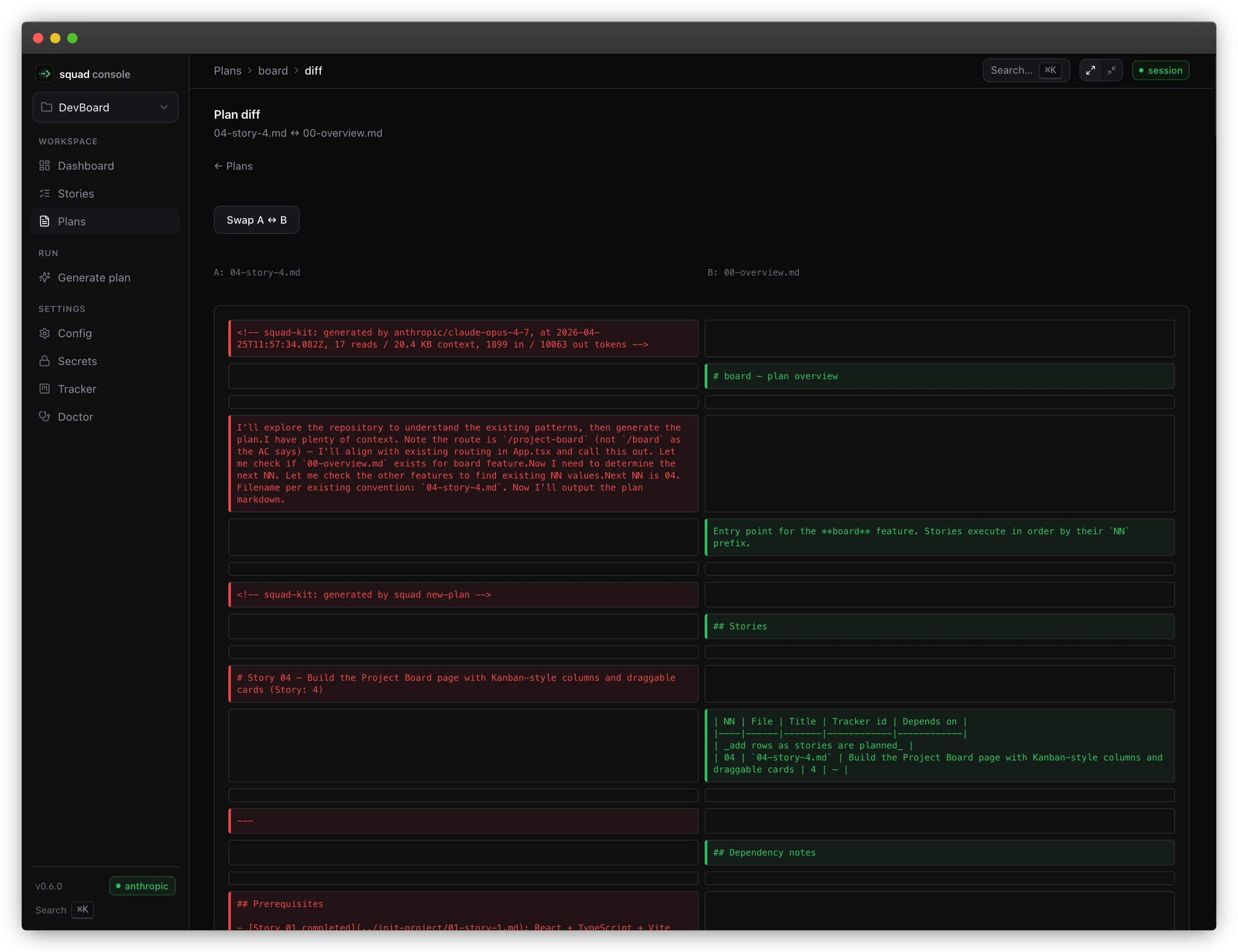
Browse plans per feature, open a markdown viewer, compare any two plan files in a feature with a readable diff, delete when needed.
Generate plan
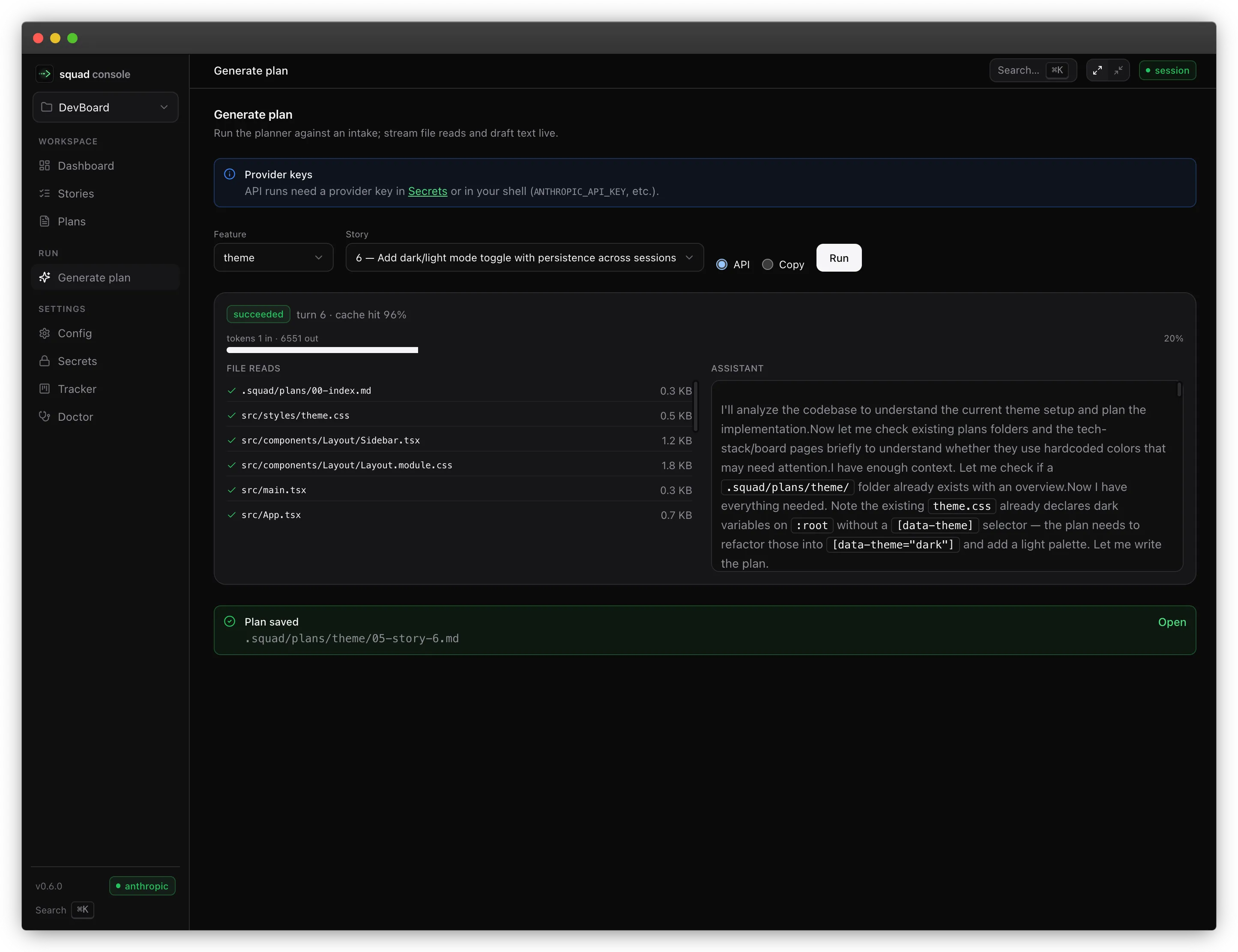
Pick a story and start an API planning run. The UI subscribes to SSE and shows streaming tool use, assistant text, cache ratio, and rate-limit waits. Cancel aborts cleanly and can leave a *.partial.md on disk, same as the CLI.
Copy mode on the same page loads the composed generate-plan.md + intake meta-prompt (identical to squad new-plan --copy), shows a scrollable preview, and offers a Copy full prompt button with step-by-step paste instructions — no terminal required.
Config, Secrets, Tracker, Doctor
- Config — form + YAML views; save runs the same schema validation as
squad config. - Secrets — masked fields; Test connection reuses the doctor probes.
- Tracker — search Jira / Azure and import an issue as a story.
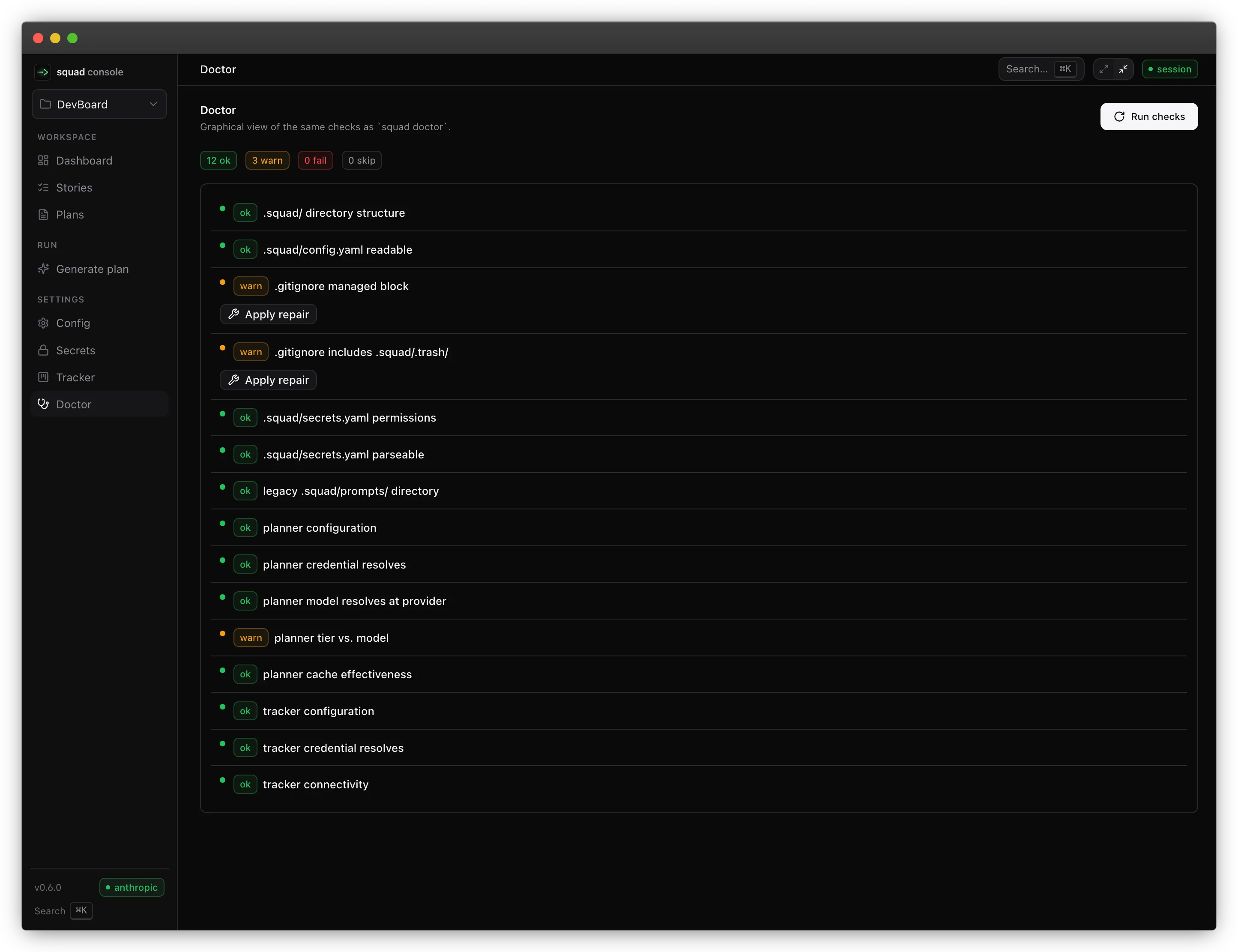
- Doctor — graphical PASS / WARN / FAIL with expandable detail; apply non-destructive fixes when offered.
Anthropic authentication in the console
New in 0.12.0. The console guides the Claude login; it never performs it. There is no login endpoint and no “Sign in” button — the server cannot complete a browser OAuth callback on your behalf, so every surface that needs a login offers the command with a copy button instead. Background: Anthropic authentication.
Config → Authentication
When the planner provider is Anthropic, the Planner card gains an Authentication select with the three planner.auth.anthropic values:
| Option | Helper text |
|---|---|
| Claude subscription (browser login) | Runs on your Claude plan. No API key needed. |
| Anthropic API key | Uses ANTHROPIC_API_KEY or the key saved in Secrets. |
| Automatic | Prefers your Claude login when signed in, otherwise falls back to the API key. |
Two callouts can appear beneath it:
- “No Claude login detected” (warning) — you picked
subscriptionand nothing was found on this machine. Saving is still allowed; the next run is what fails. A copyablesquad auth loginsits inside the callout. - “Subscription auth cannot use this runtime” (danger) — subscription auth with the
vercelruntime, or with a non-Anthropic provider. This one disables Save, and the text is the same stringsquad doctorand the CLI print.
Secrets → Claude account card
Above the Planner keys, the Secrets page shows a Claude account card:
- Signed in — a green badge plus the live account line (email · organization · plan), and
apiKeySourcewhen the SDK reported one. - Not signed in — a muted badge, a one-line explanation, and a copyable
squad auth login. - Using an API key — the card collapses to a pointer at Config for switching modes.
- Check again — the only control that runs a live probe. A normal page load never spawns an Agent SDK subprocess.
- Stored token — when
.squad/secrets.yamlholds aplanner.anthropicOauthToken, it is shown masked with a Remove button (equivalent tosquad auth logout). IfCLAUDE_CODE_OAUTH_TOKENis also set, the card says so — the environment variable wins.
A failed probe renders as “Could not verify”, never as “signed out”: sending a logged-in user to fix a login they already have is worse than saying nothing.
While a subscription is doing the work, the Anthropic API-key field stays visible but visually stepped back — a subscription user may still want a key as a fallback.
Account details are shown live and never persisted. The email, organization, and plan are fetched on demand for display only; nothing under .squad/runs/ ever records them.
Generate → auth badge, billing copy, and recovery
- An auth badge above the story picker reads Subscription or API key, with the credential hint and
apiKeySourcein its tooltip. During a run it prefers the run’s ownauth_infoevent, so a mid-run Config change cannot retro-change the badge on a run that already picked its credential. - The billing callout branches on mode. Subscription runs get “Runs on your Claude subscription” — no per-token API bill, but usage counts against the same limits as Claude and Claude Code. API-key runs get the usual per-token wording.
- The Run identity card gains an Auth row:
subscription · Claude login (macOS Keychain) · oauth. Pre-0.12.0 run records show—rather than an invented value. - Recovery state — a run that fails with
auth_unavailablerenders a dedicated “No Claude credential available” callout carrying the resolver’s own message, a copyablesquad auth login, and a link to Config, instead of a generic “Run failed”. - A subscription run that hits a limit shows “Claude usage limit reached” with the countdown ring, and explains that planning draws on the same usage window as Claude and Claude Code — not a provider API rate limit, and no link to a provider limits dashboard.
Runs
The runs index has an Auth column with a sub / key chip. Runs recorded before 0.12.0 carry no authMode and show —. The run report page replays the same Auth row on its identity card, seeded from the run summary so it survives event-file rotation.
The screenshots on this page were captured on 0.6.0 and do not show the auth badge or the branched billing callout described above.
Multi-project
The top bar lists recent project roots from ~/.squad/recent-projects.json. Each console process serves one workspace. Opening another project in the same tab is not supported; choose a recent root and the UI copies cd <that-root> && squad console so you can run it in a second terminal. Full multi-server federation is out of scope for v1.
Run history on disk
Every API run writes a summary JSON and an event log JSONL under .squad/runs/:
.squad/runs/<runId>.json— final stats, model, durations, validation summary..squad/runs/<runId>.events.jsonl— full timeline (tool calls, usage, scout, validation).
The 5 newest event logs stay uncompressed; the next 15 are gzipped to <runId>.events.jsonl.gz. Logs older than 20 runs are dropped. Thinking text is redacted on disk (block count and duration are kept); the live console stream still shows full thinking content.
Since 0.12.0 the summary records the resolved authMode and the events stream carries one additive auth_info event. Both keep mode and apiKeySource only — no token, no API key, no email, and no organization. Account details are fetched live for display and never written to disk.
Browsing runs
/runslists the last 20 runs with model, runtime, duration, token totals, cache hit %, validation count, and outcome./runs/<runId>re-renders a finished run with the same activity feed, stage pipeline, and tabs as the live Generate page. Thinking content is replayed as a “block summary only” chip (live runs show full thinking text; disk redaction is intentional).- Runs older than the 20-record retention are gone from the UI; the underlying disk policy keeps the 5 newest events JSONL uncompressed and gzips the next 15 (see “Run history on disk” above).
Development setup
For Vite hot reload against a running squad console, see console-ui/README.md.
Generate page and Agent SDK runs
On the Generate stream, the cache summary line shows (agent-sdk: not exposed) when the run used the Anthropic Agent SDK runtime: prompt cache still applies on Anthropic’s side, but the SDK does not surface cache_creation_input_tokens / cache_read_input_tokens in telemetry. Token rows may stay aggregate-only during the run until the final usage event.
Troubleshooting
| Issue | What to do |
|---|---|
| Port already in use | Run squad console --port <n> or stop the other process on 4571. |
| Session token missing or invalid | Close the tab and relaunch squad console from the project; use the fresh URL. |
| Charts show “no runs yet” | Run Generate (or squad new-plan --api) once so .squad/runs/ is populated. |